Creative agency glossaryVideo and Post-Production

Smart Device Camera Control

Smart device camera control is the operation of cameras, motorized rigs and lighting from a phone or a tablet, letting a crew program moves, trigger shots and adjust settings without touching the equipment.

What is smart device camera control?

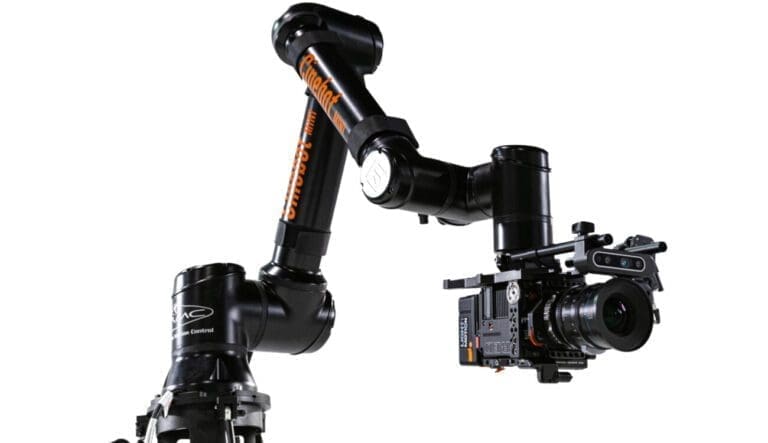
Smart device camera control is the shift of the camera's controls onto a screen in someone's hand. Modern cinema cameras, motorized sliders, gimbals, pan-tilt heads, drones and even full motion control rigs can be driven from an app on a phone or a tablet, over wireless or a cable. The app exposes what used to need a dedicated controller or a hand on the body: framing, focus, exposure, white balance, record start and stop, and, for motorized rigs, the design and playback of programmed moves.

The idea extends to the whole set. Lighting is dimmed and colored from a tablet. Playback is triggered from the same device. A director can see the camera's output on a tablet across the room and a technician can run a motion control move from a phone next to the rig. The device is the control room.

Why it matters

Why smart device camera control matters

It puts control where the people are. A camera on a crane, a drone in the air, a rig inside a small set or a probe lens inside a product cannot be operated from the body, and a wireless device is how the operator reaches them. It also makes small crews capable of larger setups: one person with a tablet can run a motorized slider, the lights and the record trigger for a product shoot that once needed three.

For programmed work it is the interface for the plan. Moves are designed, saved, tweaked and replayed from the screen, with the live image beside the controls, which turns a technical operation into a visual one.

In practice

How smart device camera control works in practice

  1. 01

    The camera or the rig is paired to the device, usually over a wireless network created by the equipment or by a small bridge unit. The app then shows the live image, the settings and, for rigs, a timeline or keyframe interface for building moves. The operator sets up the shot on the screen, tests it, saves it and runs it, and settings are adjusted between takes without anyone walking to the camera.

  2. 02

    On larger shoots the devices are networked so that several people see what they need: the cinematographer with exposure and focus, the director with the frame, the rig technician with the move. Reliability is the concern, so professional setups use dedicated networks or cables rather than venue wifi, and keep a physical control as a fallback.

Watch out

What people get wrong about smart device camera control

Trusting the connection. A wireless link that drops mid-move on a programmed rig is a ruined take at best and a safety issue at worst, which is why professional work runs on dedicated networks or cables and keeps a manual control within reach. The other mistake is assuming the app replaces the skill. The screen makes the camera reachable; it does not make the move good, the exposure right or the focus where it should be. Those are still the operator's judgment.

Questions

People also ask

Which cameras can be controlled from a phone or tablet?

Most current cinema and mirrorless cameras offer an app for monitoring and basic control, and third-party bridges extend that to others. Motorized sliders, gimbals, pan-tilt heads and many motion control rigs are designed to be run from a device as their primary interface.

Is wireless camera control reliable enough for professional shoots?

On a dedicated network or a cabled connection, yes. On a shared or venue network, no. Professional crews set up their own network for the shoot and keep a physical control available for anything safety-critical.

Can a motion control rig be programmed from a tablet?

Many can. The app presents a timeline or keyframe view where the move is built, previewed and saved, often with the live camera image alongside. Larger rigs use dedicated control stations but still offer a tablet for monitoring and small adjustments.

Next to it in the glossary

  1. Robotic Camera ArmA robotic camera arm is an industrial multi-axis robot adapted to carry a cinema camera, moving it through programmed paths with speed and precision no human operator can match.
  2. Robotic FilmmakingRobotic filmmaking is the use of programmable robots, from camera arms to motorized lights and automated product handlers, to execute shots that are planned in software and performed by machines.
  3. Set DesignSet design is the creation of the physical environment a scene is filmed or photographed in, from a single styled surface to a fully built room, so the space tells the story the brand needs.
  4. Sound DesignSound design is the creation and shaping of every sound in a film that is not dialogue or score, from room tone to the click of a clasp, so that the picture feels real and felt.
  5. Storyboarding for VideoStoryboarding for video is the drawing of a film shot by shot before it is made, so the framing, the sequence and the pacing are agreed on paper while changes are still cheap.
  6. Studio Lighting PackagesA studio lighting package is a bundled set of lights, modifiers, stands and power supplied for a shoot, matched to the kind of work being done rather than rented piece by piece.

Every Video and Post-Production term →

In the work

Where it shows up

All our creations →

From the journal

Read around it

The journal →

Talking the talk is one thing

We make the work.

RIOT is a creative agency and production studio in New York. Strategy, brand, film, photography, design and the campaigns that carry them, made by one team. A few lines is enough to start: we read every brief the same day.

    Footage